Dealing with flaky tests
software-development
Flaky tests are tests that produce inconsistent and non-deterministic results, sometimes passing and sometimes failing. They can undermine the reliability of testing processes and complicate software development by masking real issues and wasting time.
Flaky tests are particularly difficult to debug and fix because of their non-determinism. We cannot simply go through the usual development cycle of test → modify → re-test. This is because we cannot reliably reproduce the error on each re-test, and thus, cannot know whether any single modification has corrected it.
Rather than going all in on one tactic, for flaky tests, I prefer to have a grab-bag of techniques at my disposal. I'll pick and choose one or tactics from this grab bag, based on the situation and context.
In this article I'll share my grab-bag of techniques. These are tactics I've used myself or seen used by others with success.
First we try to reproduce and diagnose the flakiness.
Then, once we have a (hopefully firm) notion of the cause, we can apply solutions or mitigations.
- Solutions: actually fixing the flaky tests
- Mitigations: minimising harm, impact, cost, etc. for flaky tests we cannot fix
The examples are in Jest and Playwright, as that is what I use in most of my work environments, but similar principles likely apply to other tools.
But before diving into tactics, let's take a brief step back and look at first reproducing the flakiness.
Reproducing flakiness#
Fundamental to addressing any kind of software bug is reproducing it.
But how do you reproduce a flaky test? As discussed above, flaky tests are difficult to reproduce consistently because their behaviour is non-deterministic: sometimes they function incorrectly, sometimes not.
There are a couple of options here:
- Running the test repeatedly to generate a mass of failures
- Observing prior test failures in logs
Running the test repeatedly to generate failures
We cannot reproduce the failure on a single run but we might have a chance on multiple runs.
Assuming Jest and a test script, we can use a command like this to repeatedly run a test:
for i in {1..20};
do (
  npm run test -- '≪test-path-filename≫' --no-watch ||
  (echo "Failed after $i attempts" && break)
);
done
Some test frameworks provide this re-running capability out-of-the-box. Here's how to do it with the Playwright CLI:
npx playwright test '≪test-path-filename≫' \
--repeat-each=20 \
--fail-on-flaky-tests
To increase the failure rate for reproduction purposes, we can simulate failure conditions.
For example:
- Simulating slower CPU and/or fewer cores
- Simulating lower available memory
- Simulating slower network speeds
These failure conditions should generate more failures, giving us a faster diagnosis of the cause.
Some technologies for enacting these simulations include:
- Virtual machines: Running the tests in a Virtual Machine with slow configuration.
- Containers: Running the tests in a container, such as a Docker container, with slow configuration.
- Test runners: Configuring the test runner itself to run tests slower.
Virtual machine
Using VirtualBox or similar, we can configure limited resources. VirtualBox allows limiting CPU count and processing cap.
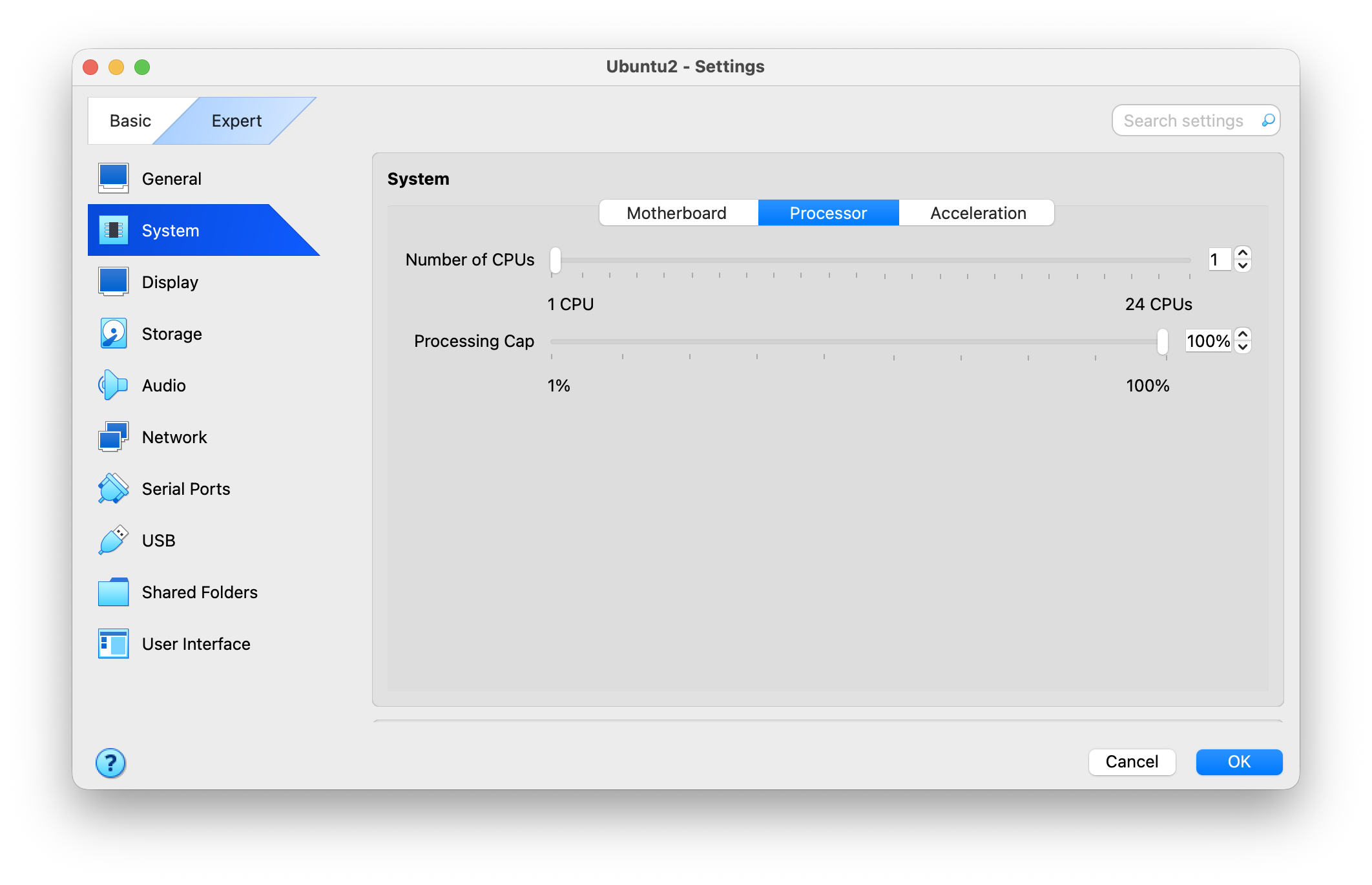
Container
Using Docker or similar, we can configure limited resources. Docker allows this via CPU arguments.
For example, we could create a Dockerfile for our app:
FROM node:22.12.0-alpine
WORKDIR /app
COPY package*.json ./
RUN npm ci
COPY . .
And use it run our tests, with constrained CPU, like this:
docker run --cpu-shares 2048 tests npm run testTest runner
In Jest, we can try one or more of:
- Turning off the cache using
--no-cache - Turning off multiple workers using
--runInBand - Increasing the worker count, using
--maxWorkers
Observing prior test failures in logs
Alternately/additionally, we can try to gather information about the test failures we have had in the past.
We can gather and analyse analytics on test results over longer periods (weeks up to months). This can be done using tools such as BuildPulse or Datadog CI Visibility, or we can build our own pipeline.
Analytics from test runs in CI can be used to identify patterns of test failure, such as certain tests failing more often. We can then narrow in on the flaky tests, gather log output from the CI environment and examine it to search for clues as to why they are flaky.
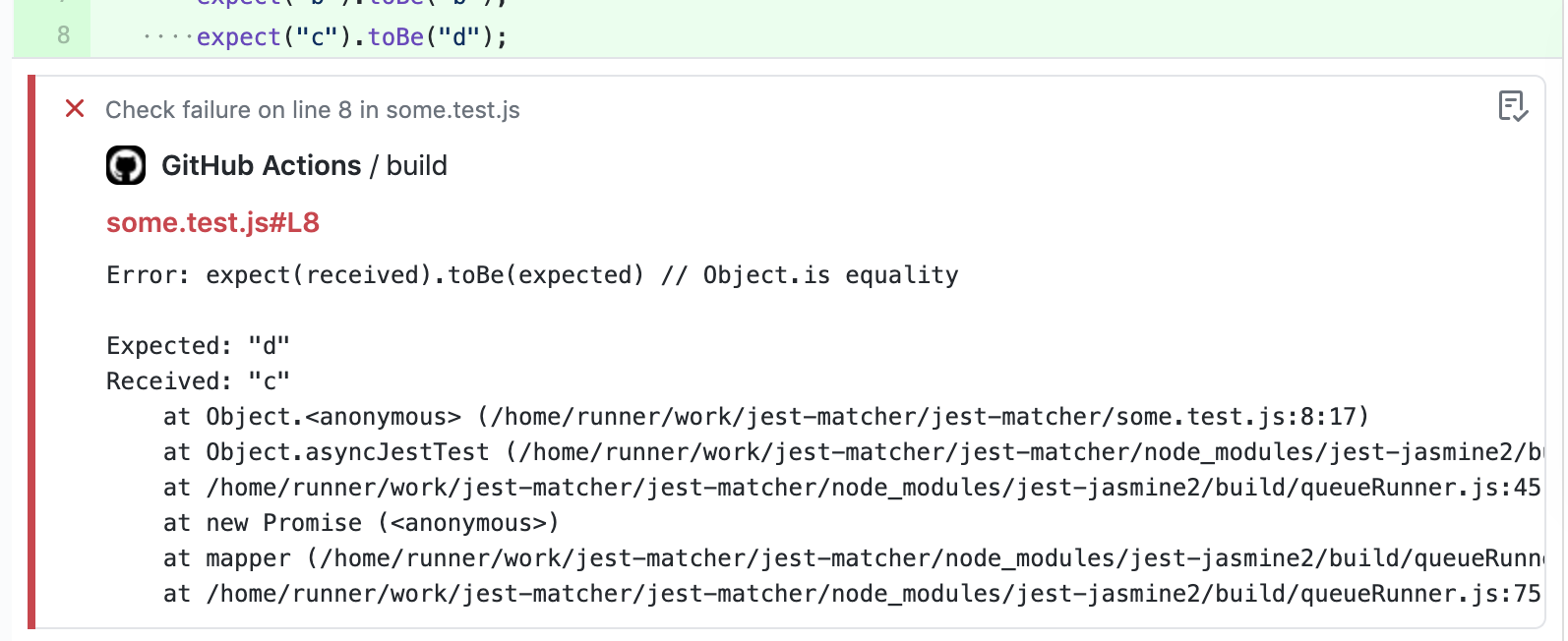
Maybe we can learn something about the cause of the failures by observing phenomena related to the failures.
| 👀 Phenomena | 🚨 Implications |
|---|---|
Test fails at a certain time of day | Issue with date/time logic |
Test fails only when modified | Issue with caching |
Test fails when the CI server is being heavily utilised | Issue with test being vulnerable to resource availability |
Diagnosing flakiness#
Once we are able to reproduce flakiness, we can move to diagnosis, to uncover the root cause.
Similar to diagnosing regular bugs, we can diagnose flaky tests by making small changes and measuring the results. With flaky test rates, rather than a single pass/fail, we measure the overall pass/fail rate. A significantly lower percentage of failures can be correlated with a code change to help uncover the cause of the failure.
Some of the usual diagnostic techniques can be applied:
- Debugging: using console logging statements to observe behaviour of the test and/or application code during test execution
- Comparing recent versions: using
git bisector similar to compare results between recent versions of the branch - Process of elimination: removing parts of code and measuring results, to "eliminate" irrelevant parts and identify parts that are actually causing flakiness
Solving flakiness#
This section covers possible solutions to flaky tests.
Some solutions might become evident from examining output after reproducing flakiness. In other cases, it might be worth experimenting with various solutions in a "try-and-see" approach.
- Await your elements
- Keep your promises
- Reduce test size
- Reduce test file size
- Reduce the number of workers
- Clean up at the end
- Optimise test code
- Optimise the application under test
- Disable resource-intensive application features when running in tests
- Increase timeouts
Await your elements
Problem: Operations occur before the DOM has completed loading. For example, the test tries to click a button inside a dialog before the dialog has loaded.
Solution: Wait until elements have been rendered before performing operations that depend on them.
❌
const deleteButton = screen.getByText("Delete");
await userEvent.click(deleteButton);

const confirmButton = screen.getByRole("button", { name: "Confirm" });
await userEvent.click(confirmButton);
✅
const deleteButton = screen.getByText("Delete");
await userEvent.click(deleteButton);


await screen.findByRole("dialog");

const confirmButton = await screen.findByRole("button", { name: "Confirm" })
await userEvent.click(confirmButton);
Keep your promises
Problem: Test operations are being done before Promises on which they rely have been completed. For example, an async API call is made, but the test runs an operation that depends on the API result before the promise has completed.
Solution: Wait for calls to have been made, using, say, a "completed" flag.
❌
jest.spyOn(accountsApi, "getAccounts").mockResolvedValue([{
  accountId: 1234,
  isPrimary: true,
}]);
jest.spyOn(accountDetailsApi, "getAccountDetails").mockResolvedValue({
  accountId: 1234,
  balance: 10,
  accountName: "Jack's Primary Account",
});

render(<PrimaryAccountDetails />);

const heading = screen.getByRole("heading", { level: 2 });
expect(heading).toHaveText("Jack's Primary Account");
✅
jest.spyOn(accountsApi, "getAccounts").mockResolvedValue([{
  accountId: 1234,
  isPrimary: true,
}]);
jest.spyOn(accountDetailsApi, "getAccountDetails").mockResolvedValue({
  accountId: 1234,
  balance: 10,
  accountName: "Jack's Primary Account",
});

render(<PrimaryAccountDetails />);

await waitFor(() => {
  expect(accountsApi.getAccounts).toHaveBeenCalled();
});
await waitFor(() => {
  expect(accountsApi.getAccountDetails).toHaveBeenCalled();
});

const heading = screen.getByRole("heading", { level: 2 });
expect(heading).toHaveText("Jack's Primary Account");
Reduce test size
Problem: A test is very long and, thus, times out before being completed.
Solution: Reduce test size.
Even if we prefer longer integration-style tests, as recommended by Kent C. Dodds in [Write fewer, longer tests], there can still be ways to reduce the size of our tests while preserving their scope.
For example:
- Remove operations that are incidental and not really required for the test to exercise the code.
- Remove operations that are already covered by other tests.
- Simplify operations. For example, retrieve a DOM element directly where possible, rather than traversing multiple parent/child elements unnecessarily.
Reduce test file size
Problem: Test files are large. Processing each large file ties up system resources (especially processor usage), causing other tests to time out.
Solution: Reduce test file size.
One way is to split up test files by function or component.
- orders-pending.test.tsx
- orders-delivered.test.tsx
- orders-cancelled.test.tsx
- orders-previous.test.tsx
Or we could use numbering or lettering system.
- small-test-01.test.tsx
- small-test-02.test.tsx
- small-test-03.test.tsx
- small-test-a.test.tsx
- small-test-b.test.tsx
- small-test-c.test.tsx
Reduce the number of workers
Problem: Test runners such as Jest may be greedy and fail to balance resource usage between tests when running many tests in parallel on resource-constrained environments such as CI
Solution: Check the CPU configuration of the CI if possible. Try to reduce the number of simultaneously running tests by configuring the test runner.
Contrary to our human intuition ("more is better") it may be better to reduce the number of simultaneously running tests. This is because test runners can be greedy and consume as many resources as possible at any given time (CPU, memory, etc). Running multiple tests at once can cause resource usage to become imbalanced, as tests compete with eachother for resources.
The solution may be to reduce the maximum number of workers. Jest allows this to be configured via the maxWorkers setting. However, if this exceeds the number of CPU cores on the machine, the processor may be forced to split execution time between multiple threads. This may cause tests to take longer than expected to execute, resulting in timeouts. This problem may only occur on CI environments, where CPU resources may be more limited, making it tricky to identify. Try reducing the maxWorkers setting or even eliminating it. (Jest defaults to the number of cores available on the machine, which is usually the safest bet.)
Clean up at the end
Problem: Tests leave behind "uncollected garbage", such as memory usage, threads, promises, etc. This slows down the test suite as a whole, making some tests flaky.
Solution: Cleaning up after each test reduces resource demand on the test runner, which reduces the occurrence of flakiness.
Note that the flaky test itself might not be the culprit here, but rather, some or all other test(s) as a whole generating garbage. This uncollected garbage might only be noticeable when all tests are run together in CI, not when running an individual test on its own. This can make the "uncollected garbage" issue tricky to detect. It might only be detectable by trial-and-error – say, observing resource usage on the whole test suite over repeated runs.
Increase timeouts
Most test frameworks provide allow timeouts to be configured.
Increasing the timeout allows tests to run longer without failing, which may solve flakiness.
- Jest has testTimeout configuration and the timeout parameter
- Playwright has timeout configuration and test.slow() (called within a test)
Downside: Increasing timeouts too much or globally might allow performance issues to creep into the application. Timeouts should be increased only on flaky tests if possible, and we should find ways to enure those features continue perform adequately for end-users.
Where the test framework allows it, longer-running integration-style tests or end-to-end tests can be decomposed into steps, which can have their own custom timeouts set. This allows the test runner to spend more time where it counts (i.e. where it reduces flakiness) without spending too long where a test really should fail (i.e. where the code is system under test is actually wrong). Playwright has test.step, which can be passed a timeout parameter.
Optimise test code
Problem: The test code is slow, leading to flakiness from timeouts during execution.
Solution: Find slow points in the test code and optimise their performance.
Test code can be optimised in various ways, including:
- Caching values that are otherwise lengthy to re-compute.
- Using more efficient algorithms or data structures. For example, array traversal could be replaced with indexed lookup.
- Optimising DOM traversal. This can include caching and re-using elements, using more efficient selectors, or avoiding unnecessary DOM access.
Optimise the application under test
Problem: The application we're testing is itself buggy or just slow. If the application itself is slow, then the automated tests that exercise it will probably also be slow, leading to flakiness.
Solution: Find slow points in the application under test and optimise their performance.
To find slow points, we can add timer statements to different parts of the test or application.
console.time("Fetch user details");
const userDetails = await fetchUserDetails();
console.timeLog("Fetch user details");
We can also try rigorous manual testing, combined with performance tooling, such as Chrome Devtools Performance tab.
Techniques to improve performance can then be applied – see: improving performance in React apps.
Mitigating flakiness#
So maybe we've tried all the above and nothing has worked. In that case, we can consider mitigation – approaches that reduce the impact of the problem without solving it entirely.
These might be used temporarily as an emergency resort or permanently if considered a reasonable compromise.
- Disable resource-intensive application features when running in tests
- Reconfigure test runners
- Tag known flaky tests and configure accordingly
- Use a different kind of test
- Use a different method of verification
Disable resource-intensive application features when running in tests
Problem: Some features of our application may be resource-intensive, causing flakiness, while not offering much value in an automated testing context.
Mitigation: Disable resource-intensive features for test environment only.
Certain application features may be inherently resource intensive and not needed to verify correctness for a given automated test.
Common examples:
- Animations (even when implemented with CSS transitions only can create drag)
- Graphics (large complex DOM-heavy graphics and loaded as part of a page, such as 3D sprites in Canvas or complex SVGs)
- Event Subscriptions (say, to backend events via WebSockets)
These features can be disabled only for test execution, via, say, feature flags.
Reconfigure test runners
Problem: Flakiness produced by resource-constrained environments is not worth the cost savings of the resource constraints.
Mitigation: Increase resources to get better value for investment, such as higher developer productivity during a critical period.
Depending on the cause, test flakiness might be drastically reduced in the short-term by simply beefing up resources on the test runners. Depending on the organisation, business context, timeframe, etc. this might be an optimal approach.
For example, suppose a legacy system is scheduled to be decommissioned in a few weeks, with a newer, totally re-written version already performing well in canary testing and ready to be rolled out next week. If the legacy system has a lot of flaky tests, blocking developers from deploying changes during that short space of a few weeks, it might make sense to increase resources just to unblock developers. Engineer time is more valuable and costly than brute resource usage.
Or suppose the business context is seasonally sensitive, such as an online retailer experiencing very high demand during holiday periods. During this period there is a high velocity of new feature releases, requiring a large number of automated tests of varying quality to run smoothly. Here, trading off resource cost for feature velocity might be worthwhile, at least during the peak period.
Tag known flaky tests and configure accordingly
Problem: Flaky tests block the whole pipeline, interfering with delivery velocity.
Mitigation: Separate flaky tests from non-flaky tests, to ensure that they run correctly or at least do not disrupt other tests.
Many test frameworks allow tags to be applied to tests, allowing those tests to be grouped and treated as a unit, for separate execution, separate configuration, or some other kind of separation.
Flaky tests, once identified, can be grouped in this way for special treatment.
In Playwright, test tags can be included in the test name:
test('test full report @flaky', async ({ page }) => {
  // ...
});
In Jest, a similar effect can be achieved by passing a carefully written regex to the testNamePattern config setting:
package.json:
"scripts": {
  ...,
  "test": "jest --testNamePattern='^(?!.*\@flaky).*$'",
  "test-flaky": "jest  --testNamePattern='^(.*\@flaky).*$'",
  ...,
},
Once separated, flaky tests might be treated in various ways:
- Separate environment: for example, run flaky tests on an instance with more resources (CPU, memory), faster network connections, etc.
- Separate lifecycle: for example, run flaky tests periodically, so that they are still useful but do not block non-flaky tests.
- Separate execution style: for example, re-try the flaky test more times than other tests so that they don't fail
Use a different kind of test
Full end-to-end browser tests are known to be more flaky than traditional unit or unit-style integration tests. This is due to the performance overhead of loading a whole browser, loading the whole application at once, triggering interactions with whole DOM elements and waiting for feedback.
We could instead shift some of these tests to integration-style unit tests. Described in Kent C. Dodd's famous article Static vs Unit vs Integration vs E2E Testing for Frontend Apps, these tests can cover entire user flows (such as logging in) while mocking the calls that could otherwise call flakiness, such as server-side API calls.
Another option, for tests target intermittent but approximately deterministic behaviour, is to use fuzzy logic to verify that behaviour. For example, suppose we need to exercise some behaviour that operates on the current date and time, but for some reason cannot control the current date and time by mocking. If the test assertion does not need to have millisecond-level precision, perhaps we could instead assert against a range considered correct.
❌
expect(timeAfterClickPause.getTime())
    .toEqual(new Date(2026, 3, 1, 13, 1, 1).getTime());
✅
expect(timeAfterClickPause.getYear()).toEqual(2026);
  expect(timeAfterClickPause.getMonth()).toEqual(3);
  expect(timeAfterClickPause.getDate()).toEqual(1);
  expect(timeAfterClickPause.getHours()).toEqual(13);
  expect(timeAfterClickPause.getMinutes()).toEqual(1);
  expect(timeAfterClickPause.getSeconds()).toEqual(1);
Use a different method of verification
If our automated test is trying to exercise something that is inherently prone to intermittent failure, within no acceptable margin of error, perhaps we need a different method of verification altogether.
For example, there is probably no good way to write an automated test for generating the next Bitcoin hash on the official fork. (Until/unless we get quantum computing in the cloud, in which case, any crypto-based business model might be in jeopardy!) For this case, we would probably need to wait until we have a large and engaged enough user base and then apply observability.
Various methods of verification that might fit the scenario:
- Local browser tests: tests that are run locally and manually by engineers, not in CI.
- Monitoring / observability: simply provide observability into a feature without necessarily testing it. Failures can be surfaced in a dashboard or alert. Downside of this method: we risk catching a failure too late, after it has already affected a significant number of users before being discovered.
- Manual testing: periodically manually test a feature in a prod-like environment.
- Visual diff testing: automatically capture screenshots of the application or component, raising alerts when differences are detected. Causes of differences can be sought by, say, comparing versions of the code base (using
git bisector similar).
Preventing flakiness#
Prevention is better than the cure, in test health as in human health. We can prevent flaky tests by following good practices in test design and implementation.
Some of these practices are covered in my Front end development checklist - Testing section and include:
- Avoiding async code where possible
- Await all expected async side-effects by the end of the test, to avoid dangling promises.
- Check for async assertions not running at all, causing unit test to break or to not properly cover the system under test.
- Use
waitFor,findBy*or equivalent to explicitly await all expected side-effects. - Use
voidrather thanasyncprefix withrenderAsyncComponent, then wait for one of its elements to render (usingfindBy*orwaitForblock). - Always
awaitcalls touserEventsuch asuserEvent.click(), etc. - Run the test many times repeatedly to test for flakiness (time permitting).
- Wait for asynchronous mocked API calls to complete before making assertions that depend on their completion.
- When there's a chain of API calls, see if you can wait for each to evaluate first, before asserting, to reduce likelihood of flakiness.
Conclusion#
Flaky tests undermine testing processes, developer morale and ultimately product reliability. So it's important to address them. Unfortunately fixing flaky tests can be more difficult than consistently failing tests, due to their non-determinism.
Difficulties reproducing flaky tests can be addressed by:
- Running the test repeatedly to generate failures
- Observing prior test failures in logs
Flaky tests can be dealt with by:
- Solutions: Optimising async or time-sensitive code, optimising test or file size to smooth test runner execution, configuring the test runner itself (workers, timeouts) or optimising the application under test.
- Mitigations: Disabling application features that tend to induce flakiness, increasing test runner resources (temporarily or permanently), separating flaky tests (say, by tagging) or opting for a different kind of test or verification.
Further reading#
- Article: Troubleshooting Jest • Mindful Chase
- Article: Debugging slow Jest tests • Harry TALBOT
- Article: Optimizing Jest Performance • Andrey LUIZ
- Article: JavaScript Unit Testing Performance • Christoph NAKAZAWA
- Article: Slow running Jest test cases – How to optimise it? • Sumanta BANERJEE
- Article: Jest simple tests are slow • StackOverflow
- Article: How to Reproduce CI Failures Locally in Playwright • Debbie O'BRIEN
- Article: Improve Jest Runner Performance • Vikram GUPTA
- Article: Troubleshooting · Jest • Simen BEKKHUS
- Article: How I fix flaky tests • Jason SWETT
- Article: What causes flaky tests • Jason SWETT