Front end development checklist
software-development
I thought I would share my front end development checklist.
Why I use a checklist#
Many who worked with me will know I'm a big fan of checklists. I think a good checklist can benefit you in several ways.
- It helps you get started. When the task ahead seems overwhelming, such as reviewing a giant pull request, you can just start with the first checklist item and keep going from there.
- It helps you organise your thinking. Quickly get clarity on what matters and doesn't matter. Avoid overwhelm and mental fog by following a predictable process.
- It helps you identify blind-spots. Common human biases (such as confirmation bias) and also your own individual biases (from past experiences).
Professional software construction and code review are complex tasks involving many elements. Research shows that the human mind is limited and can only work with a finite number of concepts at a given time.
“the working memory is only capable of processing two to six things at a time ... When you are trying to solve a problem that involves too many elements ... your working memory will become “overloaded.””
Additionally, research shows the human mind can be affected by cognitive flaws and biased thinking. While we are capable of thinking rationally, our minds, in an attempt to conserve energy, often default to a shortcuts and heuristics, leading to critical errors. In Thinking, Fast and Slow, cognitive psychologist Daniel Khaneman describes several of these errors, such as the anchoring effect and the availability heuristic.
A good checklist can help you overcome these biases and errors. Surgeon and author Atul Gawande famously wrote a book about this, demonstrating the use of checklists in mission-critical contexts from passenger flights to hospital operating rooms.
“Checklists seem to provide protection against such failures. They remind us of the minimum necessary steps and make them explicit. They not only offer the possibility of verification but also instill a kind of discipline of higher performance.”
Similar points about checklists have been made by Michael Mauboussin and Charlie Munger.
How to use a development checklist#
You can use a development checklist in the following ways:
- Self review, prior to submitting changes. Check your work against the list. This gives you an opportunity to anticipate and address any issues in advance, which reduces the code review burden on team mates and helps you to get faster approvals.
- Code review, on others' changes. Check others' work against your checklist. You can deliver useful feedback and mentor colleagues.
When scanning the list and picking items to check, you can factor in what makes sense for your current team and project. In this article I provide a general front end development checklist. But you can create your own variants of the checklist, such as one for each project.
Automation and AI#
Checklist reviews can be partially or fully automated using AI assistants.
You can feed a checklist and code changes into an AI assistant, using a prompt like this:
Please review the code changes in the current branch.

Look at the checklist in the file: `≪~/Downloads/front-end-development-checklist.md≫`.

Identify which checklist items are relevant for this change.

For each relevant checklist item:
- Review the code change and evaluate whether complies or not.
- List any checklist items for which the code change is not compliant.
- For each non-complied checklist item, provide an explanation and recommendation on how to address it.There are other ways a checklist can be used with AI to boost productivity, such as:
- When vibe-coding, include instructions for the AI assistant to self-review its work against the checklist, either in the prompt or in context files.
- When using the AI assistant to generate a solution design, prompt it to self-review the solution design against the checklist.
- Prompt the AI assistant to go review the whole code-base against the checklist and list cases where the items are not complied with.
Continuous improvement#
Feedback you receive in code reviews can be incorporated back into the checklist.
This creates a cycle of continuous improvement, making the checklist a dynamic adaptive system.

Other high quality resources that can be used as sources for checklist items include books, online courses, podcasts, open-source code-bases and code review feedback from past projects
Precedent-based model for code reviews#
For team projects, where I add/modify a checklist item in response to feedback, I like to include a link to specific feedback comment.
In subsequent code reviews, if a similar issue is being discussed, I can simply locate the closest matching guideline in the checklist and mention it in the discussion thread, with a link back to the original discussion. The linkage to the prior discussion helps to ground the discussion and provides a precedent for my decision in that specific case.
I found success with this approach, in the following ways:
- In some cases, the team agree to stay consistent with the approach suggested by the link to the prior discussion. This agreement helps to drive consensus and move the pull request toward approval.
- In other cases, a different approach is proposed. Agreement is found. I can improve the checklist by updating it with a link to this more recent discussion. Additionally, the team benefits by gaining more clarity over the reasoning behind the decision and also a sense of the broader approach being followed.
- In a few cases, there is lively debate about which approach to follow. Here, the "precedent model" helps us to organise our thinking and to keep the discussion on-track. In the worst case, I can at least demonstrate effort, think clearly, disagree and commit and maintain forward momentum.
Organising and filtering the checklist#
With 916 items and growing, you well might wonder how I have the time to go through that many items. 😂
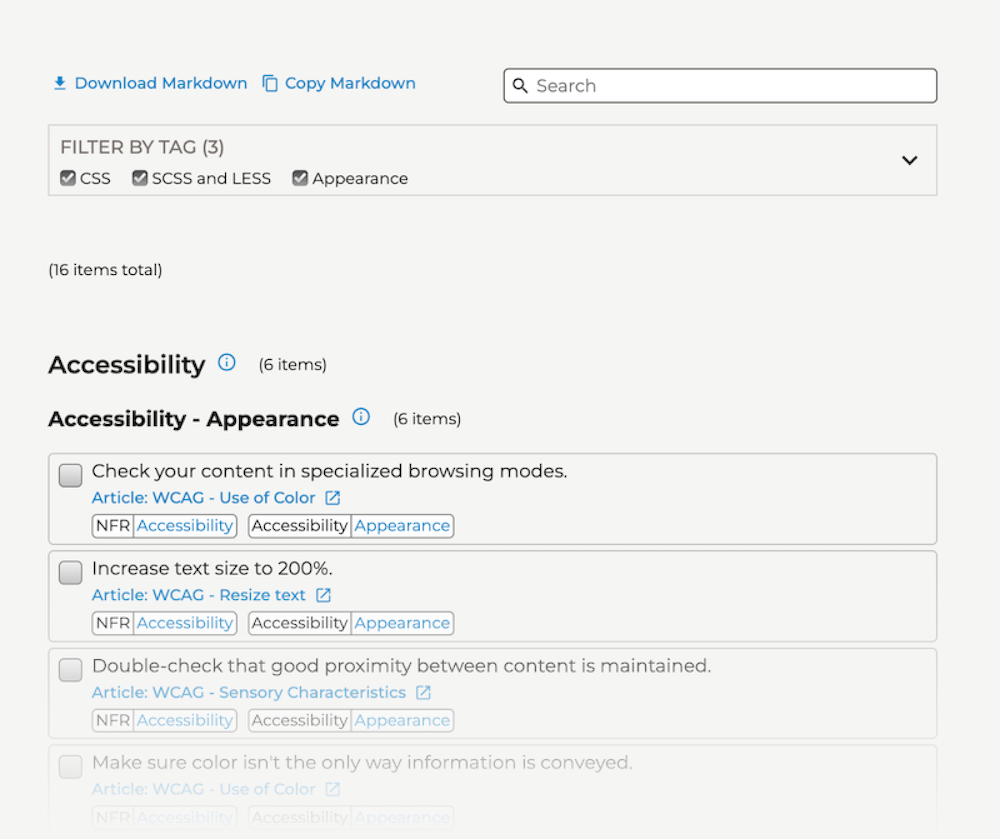
The truth is that I only use a subset of checklist items per situation. The checklist items are grouped into headings and tags which can be filtered. Using the filters, I can quickly narrow down the list to a much more manageable size.
For example, when reviewing a code change that only affects styling, I can filter by styling-related tags.
Front End Development Checklist#
Here is the link to the checklist:

You're welcome to download and re-use it for your own purposes and suggest improvements.