Living systems blueprint
software-engineering
Imagine you're a new joiner in a corporate environment.
You are faced with a complex network of systems: databases, servers, platforms, logs, etc. Links to them are scattered around various internal wiki pages, buried in chat threads, etc.
You have the challenge of trying to get your head across everything fast enough to be useful to the team.
You need a map of where to find everything that concerns you.

This is because whenever you get hit with a new code review, bug report, prod support ticket or just regular task, you will need to quickly locate specific systems and jump into them instantly.
This is not about conceptual or theoretical knowledge. It's about being able to actually navigate and access real, running systems.
- Read actual logs
- Query actual databases
- Push actual code changes
Here is where a "living systems blueprint" might come in handy.
What it is#
Borrowed from the service blueprint, famous in the world of UX design, this is a diagram of services.
A service blueprint is a diagram that visualizes the relationships between different service components — people, props (physical or digital evidence), and processes — that are directly tied to touchpoints in a specific customer journey.
However, for our purposes as software engineers, it focusses on technical systems and services.
And it has an important additional feature: links. Crucially, you want this to be more than a diagram. It should link you to the real systems so you can actually ... you know ... do stuff!
You can create a diagram like this yourself, for your own use. Its sole purpose is to help you navigate your digital work environment. To diagrammatically represent all the important systems you might work with and how they connect to each-other.
Diagram format#
Here's an example of such a diagram:
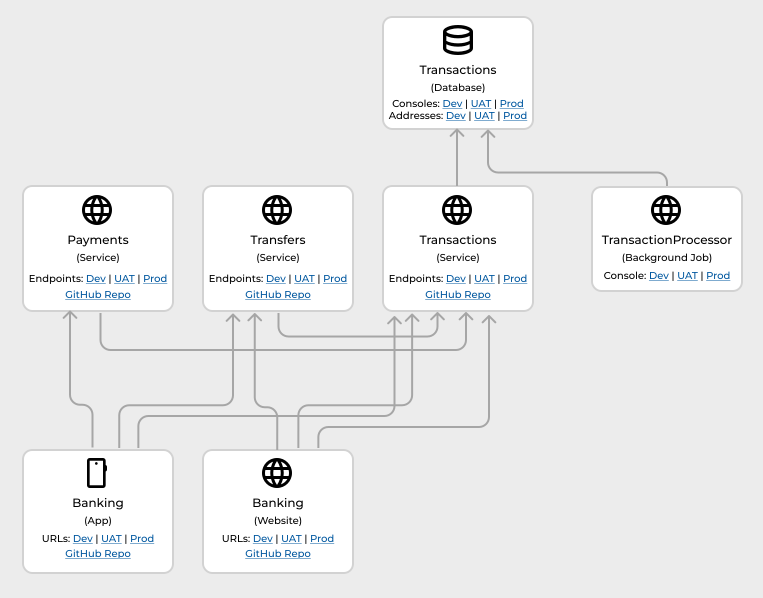
Notice the links. One click (or copy and paste into a tool) can take you directly to the system.
Say, to a CloudWatch log in Prod. Or a Postgres database in UAT. Or an API request in Postman.
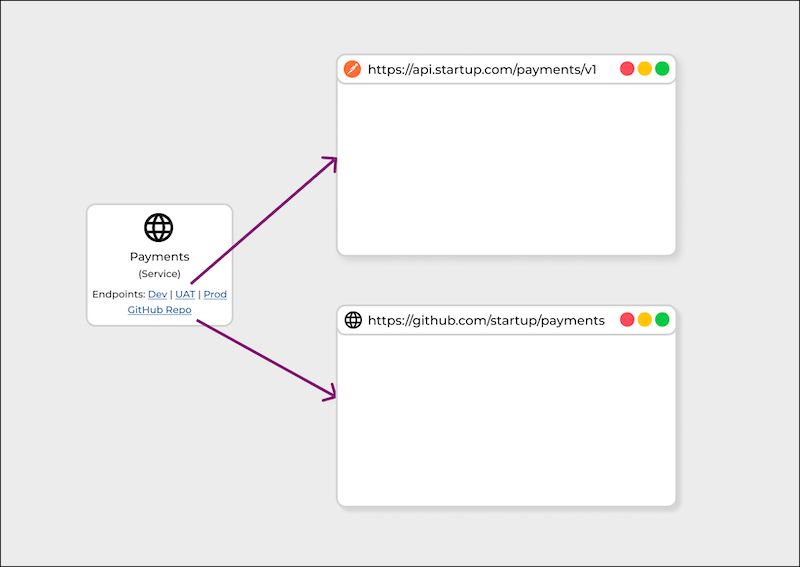
Here is a breakdown of the elements of the diagram:
Components | Depicted by a rectangle 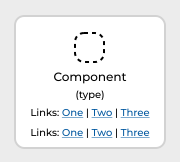 | Components of the system, such as services, databases, log storage, blob storage, mobile apps, web front ends and more. |
|---|---|---|
Dependencies | Depicted by a line and arrow  | Dependencies between components, so that one "depends upon" another, such as a service depending on a database. |
Compositions | Depicted by a line and circle  | Compositions of components, such as parent/child or container/contained. |
Within each component rectangle, we have:
| Icon | Quickly identify the type of the service. | Simple shape, such as a Material Design icon, or one of the standard vendor or cloud provider icons, say for AWS, Azure, Google Cloud, etc. |
|---|---|---|
| Title | Title of the service, as referenced in code, docs, etc. | Text in a larger font. |
| Type | Type of service. E.g. Web Service, Log, Database, Mobile App, etc. | Text in brackets, in a smaller font. |
| Links | Links to access the entity or related to the entity. For a web application, it might include links to environments. For a database, it might include links to a console or a URI that can be plugged into a database client. | Text with underlined links, in a smaller font. |
Within the "Links" row, you might put links to the system itself, including multiple environments (also known as "stages") such as Development, Staging and Production.
| Development | Staging | Production |
How it helps#
Building a living systems blueprint has helped me in two ways:
- Learning a new system
- Working with a complex system
Learning a new system
It has been demonstrated that "active learning" techniques, such as writing and reacting to real-world problems, can be more effective than passive learning, such as just reading.
Applying this approach to learning systems, it can be helpful to develop in your mind a strong mental model of what your systems are made of and how they work. This can prepare you to "think on your feet", contributing usefully to meetings and discussions and solving unexpected problems at short notice.
This kind of "theory building" is already a well-known in at the code level.
“The programmer having the theory of the program can explain why each part of the program is what it is”
•••
“The programmer having the theory of the program is able to respond constructively to any demand for a modification of the program”
With a living systems blueprint, we can apply similar techniques to learn at the systems level.
Of course, you might not need a living systems blueprint if you're working with a very simple system, with a few parts. Or if you're already very familiar with your system, having worked with it regularly for a long time. In these cases, likely your brain has already memorized the systems in its Long Term Memory (LTM). And you can use simpler tools such as browser bookmarks and address-bar auto-suggest to navigate to them quickly as needed.
Working with a complex system
Suppose you're working with a complex system comprising many services; too many to memorize all their names. There might be complex or non-intuitive integration patterns. You might want to access any part of this system unexpectedly at a moment's notice.
Here a living systems blueprint can help you to access your Long Term Memory. Its spatial and connected form can provide visual cues to help you refresh your memory quickly. The connections can be visually traversed to quickly locate just the resources you need via links, whether they are logs, consoles, dashboards, code files or anything else.
“the LTM needs clues to retrieve the right memories. The more specific the clue, the more likely we are to find the right memory”
For example, imagine someone comes to you with the following request:
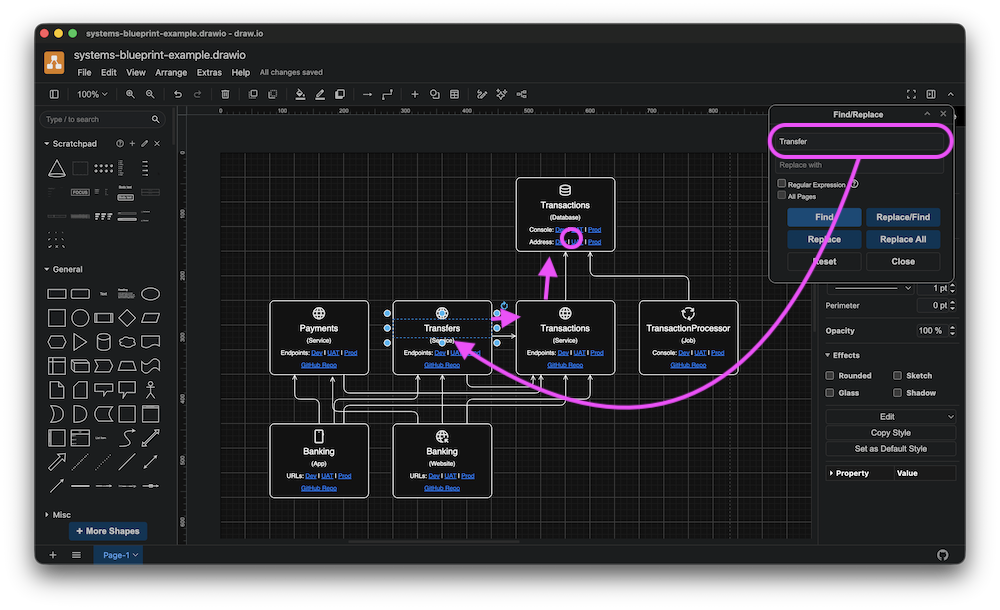
Help! Panic! I need to find out why Transfer from customer #098238 are failing in UAT!
You can check your living blueprint, locate the Transfer service, see that it's connected to the Transactions database and follow the link to the Console in UAT to query recent transactions. The diagram jogs your memory and quickly takes you to the right place to investigate the problem.
Systems blueprint sketches#
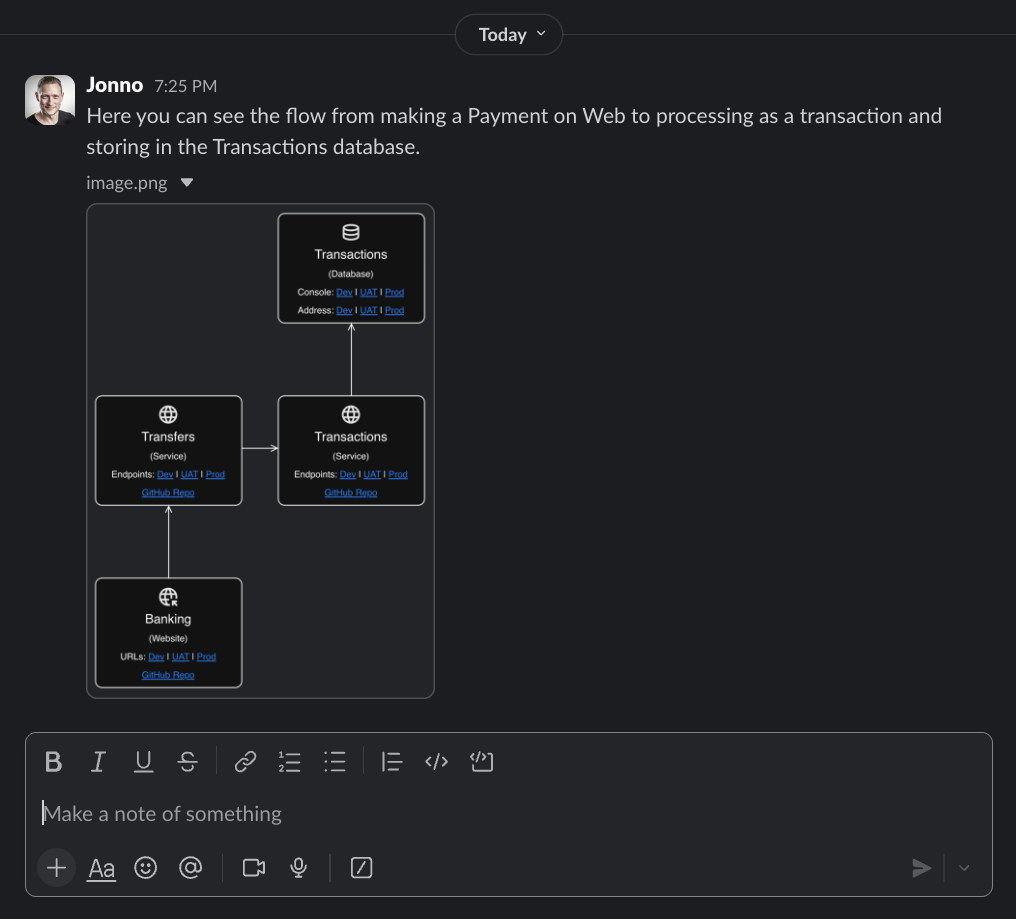
Portions of systems blueprints can be split into "sketches".
You might want to do this if your main systems blueprint gets too crowded with components or if you want to depict a group of interrelated components on their own.
You could share a sketch with a colleague via a link, as part of a discussion in, say, a chat thread, pull request discussion thread or ticket comment thread.
Sources#
Where might you acquire the knowledge to build a living systems blueprint?
Anywhere and everywhere...
- Ask your colleagues and managers
- Search chat and wiki
- Ask AI agents
- Analyse code and configuration files
- Analyse logs and output
- Analyse the applications(s) themselves
Resources#
Here are some templates you can use to create your own living systems blueprint diagram:
- Systems Blueprint Diagram - Template - Draw.io
- Systems Blueprint Diagram - Template - Figma
- Systems Blueprint Diagram - Template - Miro
And some system icon sets, depending on which (if any) vendors/providers you are using: