Enum patterns for Typescript
software-development
ℹ️ TL;DR:Typescript's built-in enum structure can be replaced with better patterns. These include an object constant pattern or a class-based pattern. The advantages of these patterns include flexibility over value types, IDE auto-suggest features and encapsulation of methods.
Typescript's built-in enum structure is woefully inadequate, to the point that even the Typescript team saw fit to list pitfalls and alternatives of enum in their documentation.
Two alternative patterns for enums in Typescript are:
- Object constant pattern
- Class with static methods pattern
In this article I will describe each pattern
Object constant pattern#
In this pattern, a const is declared, which holds the enum items as key-value pairs of an object. A type for the const is derived using type inference.
Here's the pattern:
const ≪Enums≫ = {
  ≪Entry1≫: "≪value1≫",
  ≪Entry2≫: "≪value2≫",
  ≪Entry3≫: "≪value3≫",
} as const;

type ≪Enum≫ = TypeOfConst<typeof ≪Enums≫>;
Note the as const on the const declaration. This tells Typescript to infer the type of Enums by its specific key/value entries, rather than as generic string dictionary. When the Enum type is inferred, it will be equivalent of the following:
interface Enum {
  readonly Entry1: "value1";
  readonly Entry1: "value2";
  readonly Entry1: "value3";
}
The implementation of TypeOfConst is a very simple one-liner:
type TypeOfConst<Const> = Const[keyof Const];I typically put it in a shared utils file and export it.
Example
Here's an example for enumerating a few colors:
const Colors = {
  Red: "red",
  Green: "green",
  Blue: "blue",
  Purple: "purple",
  Black: "black",
  White: "white",
} as const;

type Color = TypeOfConst<typeof Colors>;
We can use the Color to access a type that can be one of the values and Colors.{xyz} to access the values themselves.
For example, we can use Color as the type of a backgroundColor field on an interface definition:
interface ButtonProps {
  readonly backgroundColor: Color;
}
And then set its value using Colors:
const buttonProps: ButtonProps = {
  backgroundColor: Colors.White,
};
Advantages
- Flexible values
- Auto-suggest on container and entries
- Easy "go to source" on entries
Flexible values
Unlike a simple union of values, with an object const, we can separate the name of each entry from its value. This allows us more flexibility with the values, which can be strings, numbers, objects or any other type that can be assigned.
Auto-suggest on container and entries
With an object const, we get nice auto-suggest when we enter dot (".") after the const name.
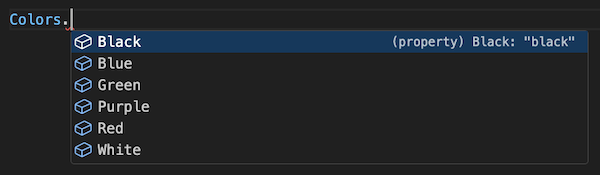
Even better, because the object const itself is named, we can use auto-suggest to find it and import it anywhere.
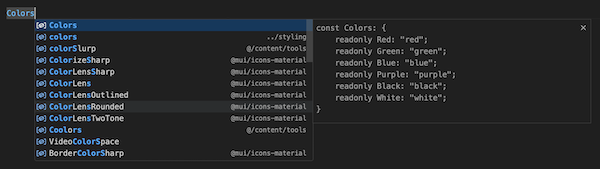
This wouldn't be possible with a simple union of values.
Easy "go to source" on entries
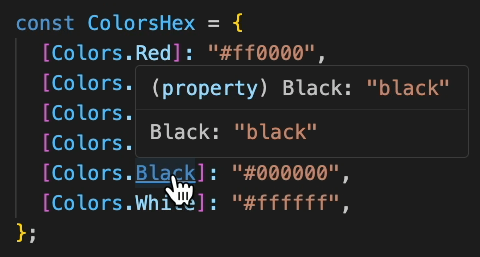
With an object const, we can use our IDE to quickly preview and/or navigate to the const source.
For example, in Visual Studio Code, we can Cmd+MouseOver the const name to see its source in a pop-up, and Cmd+Click to be taken to the source code.
Disadvantages
- Takes more code to set up
- Functions must be declared outside the enum, and won't be suggested by the IDE
Class with static fields pattern#
In this pattern, a class is declared, which holds the enum items as static fields.
Here's the pattern:
export class ≪Enum≫ {
  static ≪Entry1≫ = new Enum("≪value1≫");
  static ≪Entry2≫ = new Enum("≪value2≫");
  static ≪Entry3≫ = new Enum("≪value3≫");

  /** @internal */
  private _value: string;

  /** @internal */
  private constructor(value: string) {
    this._value = value;
  }

  getValue() {
    return this._value;
  }

  toString() {
    return this._value;
  }
}
Note that we can encapsulate a method within the enum, which we can call on any entry of that enum.
const entry1 = Enum.Entry1;
entry1.getValue();
// "value1"
Example
I found a neat example in the caplin/FlexLayout library:
export class Orientation {
  static HORZ = new Orientation("horz");
  static VERT = new Orientation("vert");

  static flip(from: Orientation) {
    if (from === Orientation.HORZ) {
        return Orientation.VERT;
    } else {
        return Orientation.HORZ;
    }
  }

  /** @internal */
  private _name: string;

  /** @internal */
  private constructor(name: string) {
    this._name = name;
  }

  getName() {
    return this._name;
  }

  toString() {
    return this._name;
  }
}
This example also exploits static methods to provide a flip method which statelessly transforms one enum value to another.
Advantages
- All advantages of the Object constant pattern, plus...
- Coupling of methods
- Encapsulation of methods
Encapsulation of methods
Methods can be defined on the enum, which have exclusive access to private fields on the enum.
Coupling of methods
Methods are strictly coupled to enum entries, rather than sitting outside as separate methods or being loosely defined on value objects. Consumers of the enum can simply type . after the enum item to reliably get a convenient list of available methods.

This is in contrast to having to guess or poke into the enum source files.
Disadvantages
- Learning curve in understanding classes
Learning curve in understanding classes
Consumers need some basic knowledge of classes: encapsulation, static methods and private fields.
This might be more suitable for those who understand OO or have a background using classes in other object-oriented languages such as Java or C#.
Conclusion#
I think the Object const pattern provides a viable enumeration pattern for most use-cases in Typescript should be easy to pick up for a broad range of Typescript developers.
The Class with static fields pattern provides more advanced usability, such as strictly coupling methods to enum items, but comes at the cost of a small learning curve for developers less experienced in class-based programming.